
OPC NEXUS│An OPC Server Comparison Guide for Manufacturing SIs » OPC Server Vendors for Industrial Automation » Moxa / MX-AOPC UA Server
Moxa / MX-AOPC UA Server

Source: MOXA Official website
(https://www.moxa.com/en)
(https://www.moxa.com/en)
MX-AOPC UA Server connects field devices to SCADA and other OPC client applications. Moxa's Windows-based software combines Modbus polling with Active Tag updates from compatible Moxa devices, allowing different data-collection methods within one installation.
For an Indian plant or distributed monitoring project, selection starts with the field equipment and the required update behaviour. Identify which devices can send active updates and which need to be polled before sizing the connection.
Key Takeaways
- Use Active Tags with compatible Moxa devices; assess standard Modbus devices through the polling route.
- Separate live data collection from database logging and historical-data recovery when defining the software scope.
- Compare Trial, Free and Paid license conditions against the number of connected devices.
- Match the software version to the host operating system, device models and client security settings.
Challenges MX-AOPC UA Server Can Help Solve
Source: MOXA Official website
(https://www.moxa.com/en/products/industrial-edge-connectivity/opc-ua-software/mx-aopc-ua-suite)
(https://www.moxa.com/en/products/industrial-edge-connectivity/opc-ua-software/mx-aopc-ua-suite)
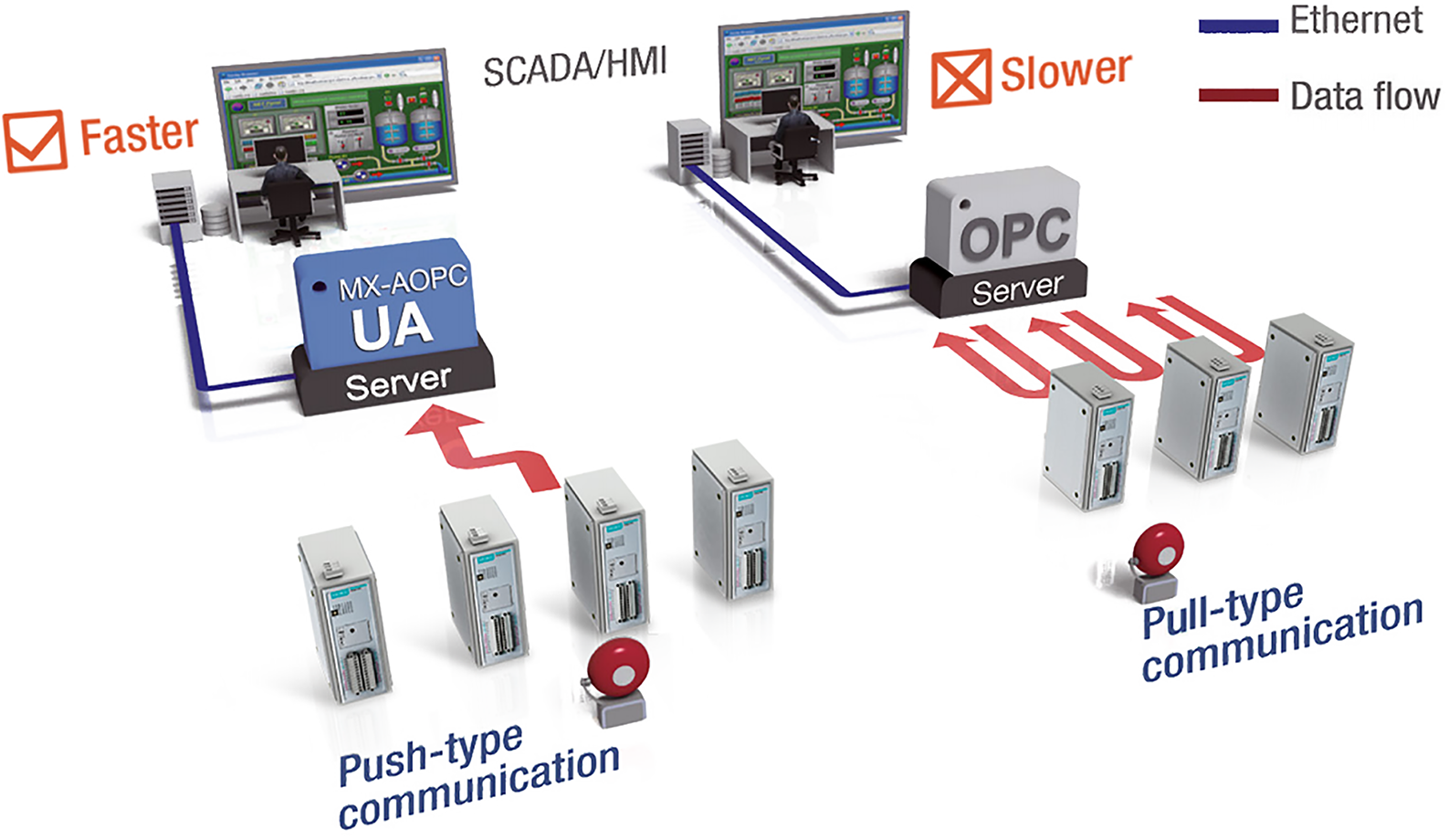
Collecting Changed I/O Values with Active Tags
Compatible Moxa I/O devices can send updates when values change or a configured interval is reached. Active Tag communication uses Moxa's AOPC protocol between the field device and MX-AOPC UA Server.
This approach reduces repeated requests for unchanged values. For remote sites, compare event frequency with the required monitoring interval to determine which signals should use change-based reporting and which need periodic updates. Test the resulting traffic with representative field data.
Connecting Modbus Devices to OPC Clients
The server also collects data as a Modbus TCP or Modbus RTU client. This polling route provides a connection for devices that expose data through Modbus registers.
Build a register map covering addresses, data types and access requirements before configuring tags. Active Tag support is device-specific; a Modbus connection alone does not give a third-party device Moxa's push functionality.
Source: Moxa, MX-AOPC UA Suite datasheet
(https://cdn-cms-frontdoor-dfc8ebanh6bkb3hs.a02.azurefd.net/getmedia/eccf090b-208b-4fce-a18f-f811eb2ef1fe/moxa-mx-aopc-ua-suite-datasheet-v1.1.pdf)
(https://cdn-cms-frontdoor-dfc8ebanh6bkb3hs.a02.azurefd.net/getmedia/eccf090b-208b-4fce-a18f-f811eb2ef1fe/moxa-mx-aopc-ua-suite-datasheet-v1.1.pdf)
How Server, Viewer and Logger Work Together
The Suite assigns different tasks to its components. Server publishes device data, Viewer checks it, and Logger records it.
| Component | Documented role |
|---|---|
| MX-AOPC UA Server | Collects field-device data and provides it to OPC clients. |
| Viewer | Displays tag values and server status for connection checks. |
| MX-AOPC UA Logger | Transfers data to supported databases and participates in data-supplement workflows. |
For network-outage recovery, Moxa documents a combination of compatible ioLogik 2500 devices, local SD-card storage, Server and Logger. Logger retrieves missing records after communication returns. Include the storage and Logger requirements when planning this workflow.
Source: Moxa, MX-AOPC UA Suite datasheet
(https://cdn-cms-frontdoor-dfc8ebanh6bkb3hs.a02.azurefd.net/getmedia/eccf090b-208b-4fce-a18f-f811eb2ef1fe/moxa-mx-aopc-ua-suite-datasheet-v1.1.pdf)
Source: Moxa, Smart I/O Data Guarantee, data completeness
(https://www.moxa.com/en/spotlight/controller-and-io/smart-io-data-guarantee/index.htm)
(https://cdn-cms-frontdoor-dfc8ebanh6bkb3hs.a02.azurefd.net/getmedia/eccf090b-208b-4fce-a18f-f811eb2ef1fe/moxa-mx-aopc-ua-suite-datasheet-v1.1.pdf)
Source: Moxa, Smart I/O Data Guarantee, data completeness
(https://www.moxa.com/en/spotlight/controller-and-io/smart-io-data-guarantee/index.htm)
Where Is MX-AOPC UA Server a Good Fit?
Evaluate the server for projects that combine compatible Moxa remote I/O with Modbus equipment and need to deliver the collected values to an OPC application. Distributed facilities should assess network demand and reconnection behaviour alongside normal operation.
A single-site connection and a multi-site monitoring rollout need different tests. Start with representative devices and the intended SCADA client, then repeat the checks with the expected device count and update rates.
Key Specifications and Compatibility
| Device-side protocols | Moxa AOPC (Active Tag), Modbus TCP client and Modbus RTU client. |
|---|---|
| OPC interfaces in User Manual v4.0 | OPC UA 1.02; OPC DA 1.0a, 2.0, 2.05a and 3.0. |
| Devices listed in the v2.2 release notes | ioLogik 2500, E1200, E1500 and E2200 Series; ioLogik E4200; ioPAC 8600 Series. |
| OS additions in v2.2 | Windows 11 and Windows Server 2016, 2019 and 2022. |
| Software prerequisite | Microsoft .NET Framework v3.5 Service Pack 1, as listed in User Manual v4.0. |
| Security additions in v2.2 | Basic256Sha256 with Sign or Sign and Encrypt. |
Use version-specific requirements when selecting the host PC. The v2.2 release notes add operating systems beyond those shown in the older datasheet's specification table. Device firmware and the receiving client's supported settings also need to match the proposed installation.
Source: Moxa, MX-AOPC UA Server User Manual v4.0, November 2022
(https://cdn-cms-frontdoor-dfc8ebanh6bkb3hs.a02.azurefd.net/getmedia/459ac94d-43f1-43b0-87c9-3c25bd6fa46c/moxa-mx-aopc-ua-suite-server-manual-v4.0.pdf)
Source: Moxa, MX-AOPC UA Server v2.2 Release Notes, 28 November 2022
(https://www.moxa.com.cn/Moxa/media/PDIM/COMMON/MX-AOPC%20UA%20Suite_moxa-mx-aopc-ua-server-utility-v2.2.zip_Software%20Release%20History.pdf)
(https://cdn-cms-frontdoor-dfc8ebanh6bkb3hs.a02.azurefd.net/getmedia/459ac94d-43f1-43b0-87c9-3c25bd6fa46c/moxa-mx-aopc-ua-suite-server-manual-v4.0.pdf)
Source: Moxa, MX-AOPC UA Server v2.2 Release Notes, 28 November 2022
(https://www.moxa.com.cn/Moxa/media/PDIM/COMMON/MX-AOPC%20UA%20Suite_moxa-mx-aopc-ua-server-utility-v2.2.zip_Software%20Release%20History.pdf)
Deployment Example: Natural Gas Wellhead Monitoring
Source: MOXA Official website
( https://www.moxa.com/jp/products/industrial-edge-connectivity/opc-ua-software/mx-aopc-ua-suite)
( https://www.moxa.com/jp/products/industrial-edge-connectivity/opc-ua-software/mx-aopc-ua-suite)
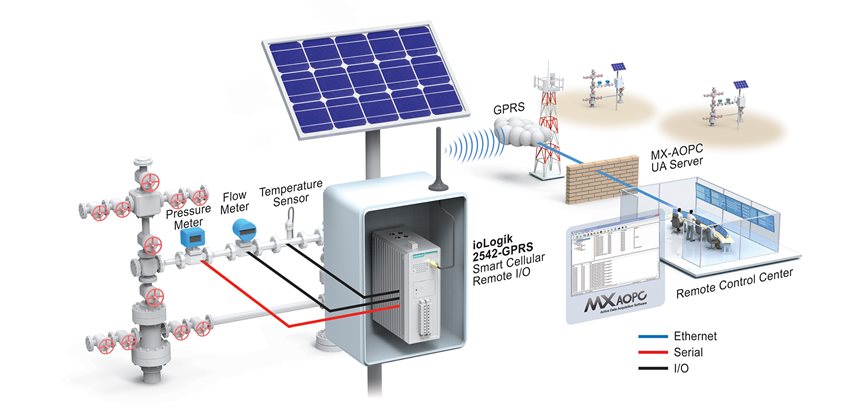
Moxa describes a Southeast European energy company's use of ioLogik 2542-GPRS remote I/O and MX-AOPC UA Server for natural gas wellhead monitoring. Active messages carry field updates to the control centre's SCADA system when I/O states change or configured events occur.
The project also used the remote I/O's integrated functions to address limited cabinet space. For a comparable installation, assess communication costs together with the hardware, power and enclosure requirements at each field location.
Source: Moxa, Increase Production Efficiency and Lower Costs with Integrated Oil & Gas Solutions, Case 1
(https://www.moxa.com/en/articles/increase-efficiency-lower-costs-oil-gas-solution). The article was published on 4 April 2017 and describes a Southeast European deployment.
(https://www.moxa.com/en/articles/increase-efficiency-lower-costs-oil-gas-solution). The article was published on 4 April 2017 and describes a Southeast European deployment.
Trial, Free and Paid Licensing
User Manual v4.0 documents three license options. The device limit and registration requirement differ by license.
| License | Connected devices | Runtime | License file |
|---|---|---|---|
| Trial | Up to 30 | 30 days | Not required |
| Free | Up to 30 | No time limit | Required |
| Paid | No licensed device-count limit | No time limit | Required |
The paid license's device-count allowance does not define achievable throughput. Size the host and validate the workload separately. For an Indian purchase, request local pricing and registration details from Moxa's sales or distributor channels.
Source: Moxa, MX-AOPC UA Server User Manual v4.0, Chapter 6
(https://cdn-cms-frontdoor-dfc8ebanh6bkb3hs.a02.azurefd.net/getmedia/459ac94d-43f1-43b0-87c9-3c25bd6fa46c/moxa-mx-aopc-ua-suite-server-manual-v4.0.pdf). License conditions shown are those documented in this manual.
(https://cdn-cms-frontdoor-dfc8ebanh6bkb3hs.a02.azurefd.net/getmedia/459ac94d-43f1-43b0-87c9-3c25bd6fa46c/moxa-mx-aopc-ua-suite-server-manual-v4.0.pdf). License conditions shown are those documented in this manual.
Download, Setup and Tag Verification
Use Moxa's official software resources to obtain the installer and matching release notes. Manual v4.0 is a document revision; v2.2 is the software version referenced in the compatibility information above.
- Install the software and select the host network adapter.
- Configure Active Tags on compatible devices, or create Modbus devices and tags in the console.
- Set the OPC UA endpoint, security policy and certificate trust.
- Apply the settings using Update Configuration to Server.
- Open Viewer and check the received tag values.
Configuration edits must be applied to Server Runtime before they take effect. During evaluation, compare values with the field device and test the behaviour after a connection loss before adding the production workload.
Source: Moxa, MX-AOPC UA Suite software resources
(https://www.moxa.com/en/products/industrial-edge-connectivity/opc-ua-software/mx-aopc-ua-suite)
Source: Moxa, MX-AOPC UA Server User Manual v4.0, Getting Started
(https://cdn-cms-frontdoor-dfc8ebanh6bkb3hs.a02.azurefd.net/getmedia/459ac94d-43f1-43b0-87c9-3c25bd6fa46c/moxa-mx-aopc-ua-suite-server-manual-v4.0.pdf)
(https://www.moxa.com/en/products/industrial-edge-connectivity/opc-ua-software/mx-aopc-ua-suite)
Source: Moxa, MX-AOPC UA Server User Manual v4.0, Getting Started
(https://cdn-cms-frontdoor-dfc8ebanh6bkb3hs.a02.azurefd.net/getmedia/459ac94d-43f1-43b0-87c9-3c25bd6fa46c/moxa-mx-aopc-ua-suite-server-manual-v4.0.pdf)
Manufacturer Information
Moxa supplies industrial networking and edge-connectivity products. Use its Find a Distributor or Email a Representative options to request local sales assistance for an Indian project.
| Company | Moxa Inc. |
|---|---|
| Product | MX-AOPC UA Server |
| Product family | MX-AOPC UA Suite |
| Official product website | https://www.moxa.com/en/products/industrial-edge-connectivity/opc-ua-software/mx-aopc-ua-suite/mx-aopc-ua-server |
Source: Moxa, MX-AOPC UA Suite product and sales information
(https://www.moxa.com/en/products/industrial-edge-connectivity/opc-ua-software/mx-aopc-ua-suite)
(https://www.moxa.com/en/products/industrial-edge-connectivity/opc-ua-software/mx-aopc-ua-suite)
[Advertisement]
OPC Server Products
by Site Requirement
OPC Server Products
by Site Requirement
Advertiser Disclosure:
We receive compensation from some of the companies listed below.This compensation may affect which companies are included and the order in which they appear.
Data Utilization and
Scalable Integration Platform
Scalable Integration Platform

* MQTT and HTTP functions are available in the Professional Edition.
Source: TAKEBISHI CORPORATION official website https://www.faweb.net/en/product/opc , https://www.faweb.net/en/product/opc/v7release
Source: TAKEBISHI CORPORATION official website https://www.faweb.net/en/product/opc , https://www.faweb.net/en/product/opc/v7release
DeviceXPlorer OPC ServerTAKEBISHI CORPORATION
Add or Change Equipment Without Stopping Operation
Communication parameters can be changed dynamically while the server keeps running, so adding a device or revising a setting does not interrupt data collection. Drivers cover 400+ device series from 100+ manufacturers, including Siemens, Rockwell Automation, Mitsubishi Electric and Omron, so most equipment changes are handled as a setting change rather than a rebuild.
One Standard Interface for Upper Systems Across Sites
Every site publishes data through OPC UA, or sends it to AWS, Azure and other cloud services over MQTT or HTTP*, so upper systems see the same interface wherever the data originates. A cloud-side OPC UA client can initiate the connection, so no inbound ports need to be opened at the site. Calculation, conditional branching and recipe handling are configured on the server itself at no additional cost, keeping that work off the SCADA or MES side.
Large-Scale Monitoring
Across Multiple Sites
Across Multiple Sites

Source: PTC official website
https://www.ptc.com/en/products/kepware/kepware-server
https://www.ptc.com/en/products/kepware/kepware-server
Kepware ServerVelotic (Kepware, formerly a PTC business)
Designed for Multi-Site Expansion
Packaged licensing* for large-scale standardization reduces the need to procure licenses when adding new sites or manage updates site by site. This supports scaling while maintaining the management framework.
Remote Management
and Configuration
and Configuration
With add-on options, OPC servers running at different sites can be centrally managed from the main site.
Audit Readiness for Plant Operations
Source: Honeywell official website
https://www.matrikonopc.com/index.aspx
https://www.matrikonopc.com/index.aspx
MatrikonOPC ServerHoneywell
Integrate Field Data
into the Monitoring Network
into the Monitoring Network
Collects oil and gas drilling data via OPC. Secure transmission across firewalls and redundancy help maintain an audit-ready data foundation over time.
Quickly Check Who Did What,
and When
and When
All servers include diagnostic logging with log-level settings and filtering. The logs can also serve as a foundation for audit trails.
*Purchasing Site & Enterprise licenses requires an inquiry to
Velotic.